

A recurring scenario#
Anyone deploying applications in Kubernetes has inevitably encountered the same question: “Where should I store my database password or API key?”.
This recurring challenge is a core part of managing sensitive data during the deployment phase. Kubernetes provides a native solution on paper, but is it truly effective?
This article explores why native secret management falls short, particularly in a GitOps context, and how specific tools establish a chain of trust to retrieve sensitive information.
Ready? Let’s dive in.
Base64 as a deception#
Every modern application requires sensitive information to function: passwords, authentication tokens, TLS certificates and so on.
Natively, Kubernetes provides the Secret object to store this data and inject it into Pods using various mechanisms such as environment variables or volumes.
apiVersion: v1
kind: Secret
metadata:
  name: mon-secret
type: Opaque
data:
  password: c3VwZXItc2VjcmV0 # Translates to "super-secret" in Base64
Example YAML file for defining a secret
This approach seems practical and simple. However, it presents a significant data security issue.
The Secret object does not actually encrypt anything. It merely encodes values in Base64. In other words, anyone capable of using the base64 -d command can read passwords in plain text.
Adopting a GitOps approach with tools like Argo CD or Flux CD involves storing all YAML files, Kustomize configurations or Helm charts in a Git repository. Committing Base64 to Git, whether the repository is public or private, is a practice to avoid for security reasons.
Values are only masked and easily read. Furthermore, this method lacks essential features for sensitive information management: rotation, access control, encryption, auditing and more.
Clearly, this native mechanism fails to meet security requirements for this type of information regardless of the environment.
External Secrets to the rescue#
Presentation#
This is where the Cloud native ecosystem enters the scene, particularly the CNCF (Cloud Native Computing Foundation) listing several tools in the Security and Compliance category, including External Secrets.
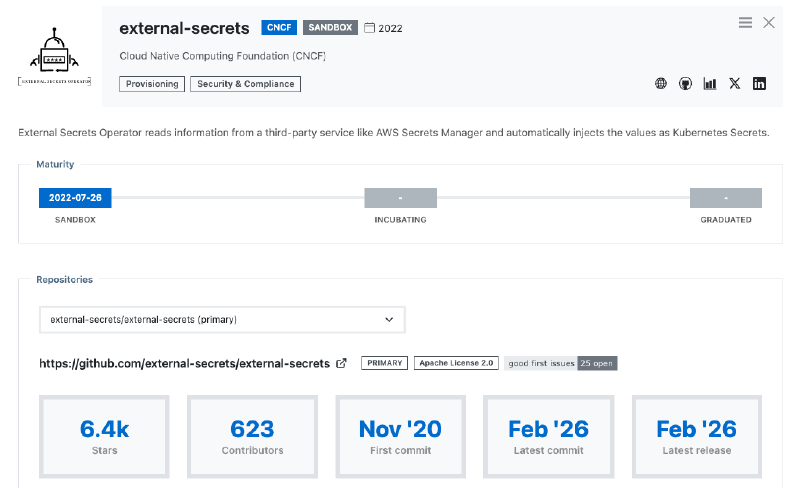
While other tools exist, this solution meets many criteria that I shall explain shortly.
External Secrets Operator (ESO), its full name, is a tool installed in Kubernetes via a Helm chart. It interacts with remote vaults to manage sensitive data and distribute it to necessary tools and applications.
Entering sandbox mode in 2022, it quickly saw massive production adoption. After a long and robust period in version 0.x, the operator reached a major maturity milestone with version 1.0 several months ago. At the time of writing, External Secrets has just moved to version 2.0, introducing a feature described below.
Written in Go, this operator reacts to custom objects using a CRD (Custom Resource Definition) called ExternalSecret:
apiVersion: external-secrets.io/v1
kind: ExternalSecret
metadata:
  name: database-credentials
spec:
  refreshInterval: 1h0m0s
  secretStoreRef:
    kind: SecretStore
    name: azure-keyvault
  target:
    name: database-credentials
    creationPolicy: Owner
  data:
  - secretKey: database-username
    remoteRef:
      key: database-username
      property: database-username
Example for retrieving a Secret from Azure Key Vault
This object contains paths with the property field to fetch sensitive values without revealing critical information. This allows it to be committed to Git safely.
Once the object is deployed in a Kubernetes cluster, the operator creates a Secret object with the corresponding values, such as database username in this example.

External Secrets excels through its versatility:
- Multiple providers: Whether secrets reside in Azure Key Vault, HashiCorp Vault or AWS Secrets Manager, the operator interfaces with almost every provider on the market. Kubernetes objects remain identical; only the backend changes.
A complete list of providers is available in the official documentation. If a vault lacks native support, the Webhook provider performs exceptionally well with available APIs.
- Advanced features: It can retrieve secrets for cluster injection, but also push secrets externally via
PushSecretresources and handle rotation.
apiVersion: external-secrets.io/v1alpha1
kind: PushSecret
metadata:
  name: pushsecret-example
spec:
  refreshInterval: 1h0m0s
  secretStoreRefs:
    - name: vault
      kind: SecretStore
  selector:
    secret:
      name: kubeconfig
  data:
    - match:
        secretKey: value
        remoteRef:
          remoteKey: kubernetes/kubeconfig
Example of PushSecret with HashiCorp Vault
The PushSecret object is a powerful tool, especially for getting and pushing cluster generated secrets. Using Cluster API to create Kubernetes clusters on the fly makes it possible to retrieve the kubeconfig and store or update it in a vault for instance.
Furthermore, Kubernetes supports specific Secret types such as Service account token, TLS or Docker config. These are easily defined using the target.template field to customise the content of the generated Secret:
[...]
  target:
    template:
      type: kubernetes.io/tls
[...]
For more details on the full range of possibilities, consult the documentation for the templating engine (version 2), as version 1 is now deprecated.
Creating secrets? But not just that…#
Version 2.0 introduces a compelling feature through the target.manifest field. This allows the creation of objects such as ConfigMap or custom resources. The purpose? Quite simply, it enables the direct creation of an object containing sensitive fields instead of relying on a standard Secret object once data is retrieved.
For teams using Argo CD, generating an Application is entirely possible provided the CRD exists on the target cluster. The argocd/applications/frontend key enables object creation using the parameter value:
apiVersion: external-secrets.io/v1
kind: ExternalSecret
metadata:
  name: argocd-app-frontend
spec:
[...]
  target:
    name: frontend
    manifest:
      apiVersion: argoproj.io/v1alpha1
      kind: Application
  dataFrom:
  - extract:
      key: argocd/applications/frontend
[...]
This functionality is particularly useful for injecting information into various object types that cannot be stored directly in Git.
Provider configuration#
Retrieving or pushing secrets requires a dedicated place to manage connections with the chosen vaults.
This is the role of SecretStore and ClusterSecretStore objects. The first is restricted to a namespace, whereas the other one applies across the entire cluster. All available providers work with both configurations.
apiVersion: external-secrets.io/v1
kind: SecretStore
metadata:
  name: aws-secretsmanager
  namespace: app
spec:
  provider:
    aws:
      service: SecretsManager
      role: # AWS Role
      region: eu-central-2
      auth:
        secretRef:
          accessKeyIDSecretRef:
            name: aws-credentials
            key: access-key
          secretAccessKeySecretRef:
            name: aws-credentials
            key: secret-access-key
SecretStore with AWS Secrets Manager for the app namespace
apiVersion: external-secrets.io/v1
kind: ClusterSecretStore
metadata:
  name: delinea
spec:
  provider:
    delinea:
      tenant: # Tenant
      tld: # Tld
      clientId:
        value: # Client ID
      clientSecret:
        secretRef:
          name: delinea-credentials
          key: client-secret
  conditions:
    - namespaces:
        - "app"
        - "backend"
ClusterSecretStore with Delinea limited to app and backend namespaces
Fields such as conditions enable extensive customisation to meet specific requirements, highlighting the tool’s maturity.
There is also the ClusterPushSecret object to configure backends for pushing secrets.
However, a challenge remains that is not unique to External Secrets but common to all such solutions. An initial secret is required to connect a SecretStore or ClusterSecretStore to the defined providers.
One secret to rule them all!#
For External Secrets to authenticate with a remote vault (as seen in the above examples), it needs a secret of its own, be it a password, a token or similar. This is commonly referred to as the “Secret Zero” problem.
External Secrets does not solve the issue of this very first secret needing cluster injection during initialisation. As previously discussed, committing it in plain text to a Git repository is not an option as it would compromise the security of the vault.
Several solutions exist for encrypting this first secret. I often use SOPS (Secrets OPerationS), a project originally created by Mozilla and given to the CNCF in 2023. This solution makes it possible to encrypt and decrypt files very quickly and easily.
The idea is to generate a private and public key (to be stored in a vault), perhaps using age and the age-keygen command to encrypt the file containing this first secret. This allows the deployment pipeline to decrypt and push the secret into the Kubernetes cluster.
$ age-keygen
# created: 2026-02-21T07:43:52+01:00
# public key: age1j8salupy7sum88gz37vjwdny6nmqxamhewe7k5h83yc9j08zqaeqt82j6f
AGE-SECRET-KEY-1D658GZYLVEP5D3NTTSKF4QVSV23RAFWPKQ6NZYVQACLP67E2D2TQLRVZ8J
age... represents the public key and AGE-SECRET-KEY-... is the private key to be stored carefully.
To encrypt sensitive data, simply place the public key in the SOPS_AGE_RECIPIENTS variable and execute the command:
$ SOPS_AGE_RECIPIENTS=age1j8sal... sops --encrypt --in-place values.secret.yaml$ cat values.secret.yaml
secretStore:
clientSecret: ENC[AES256_GCM,data:...,type:str]
sops:
age:
- recipient: age...
enc: |
-----BEGIN AGE ENCRYPTED FILE-----
[...]
-----END AGE ENCRYPTED FILE-----
lastmodified: "2026-02-21T08:30:07Z"
mac: ENC[AES256_GCM,data:...,type:str]
unencrypted_suffix: _unencrypted
version: 3.12.0values.secret.yaml file to deploy the first secret

Bootstrap pipeline to inject the first secret
The pipeline therefore acts as a bootstrap, allowing External Secrets or any other tool to run with the right information and fulfil its role.
Of course, the machine performing this action must have permission to retrieve the age private key. This is clearly a chicken and egg situation where the machine requires an identity to perform these actions. Such identities are found primarily in the Cloud or through features like Workload Identity.
Final thoughts#
Managing sensitive information is always a paramount topic regardless of the technology. As seen throughout this article, Kubernetes provides a native solution poorly suited to the GitOps philosophy as well as general secret centralisation and management.
Instead of reinventing the wheel, External Secrets acts as an interface to communicate with vaults to retrieve or push secrets, providing a set of features enabling advanced customisation.
Naturally, an initial secret still requires attention. SOPS is a fast and reliable way to encrypt and deploy it.